


Android, Linux, and Windows on Arm in One DGX Spark Workspace
Running Android, Linux, and Windows side by side on one NVIDIA DGX Spark used to mean juggling separate devices, incompatible images, and disconnected development environments.
On supported DGX Spark deployments, ARM64 virtualization can bring these environments into one browser-accessible workspace—provided the guest operating systems, installation media, licensing, and workload expectations are correct.
For teams using NVIDIA DGX Spark, Team AI Box combines local AI applications, shared files, messaging, virtual Android phones, and virtual Windows and Linux computers in one workspace. The operating systems remain separate guest environments, but team members can access them through the same browser-based platform.
That distinction matters:
Team AI Box does not replace the DGX Spark host operating system or turn Android, Linux, and Windows into one combined operating system. It provides one shared workspace for using these environments alongside local AI tools.
For teams searching for Android Linux Windows on ARM64, the practical goal is not to merge the operating systems. It is to connect them to shared AI tools, files, notes, and team workflows.
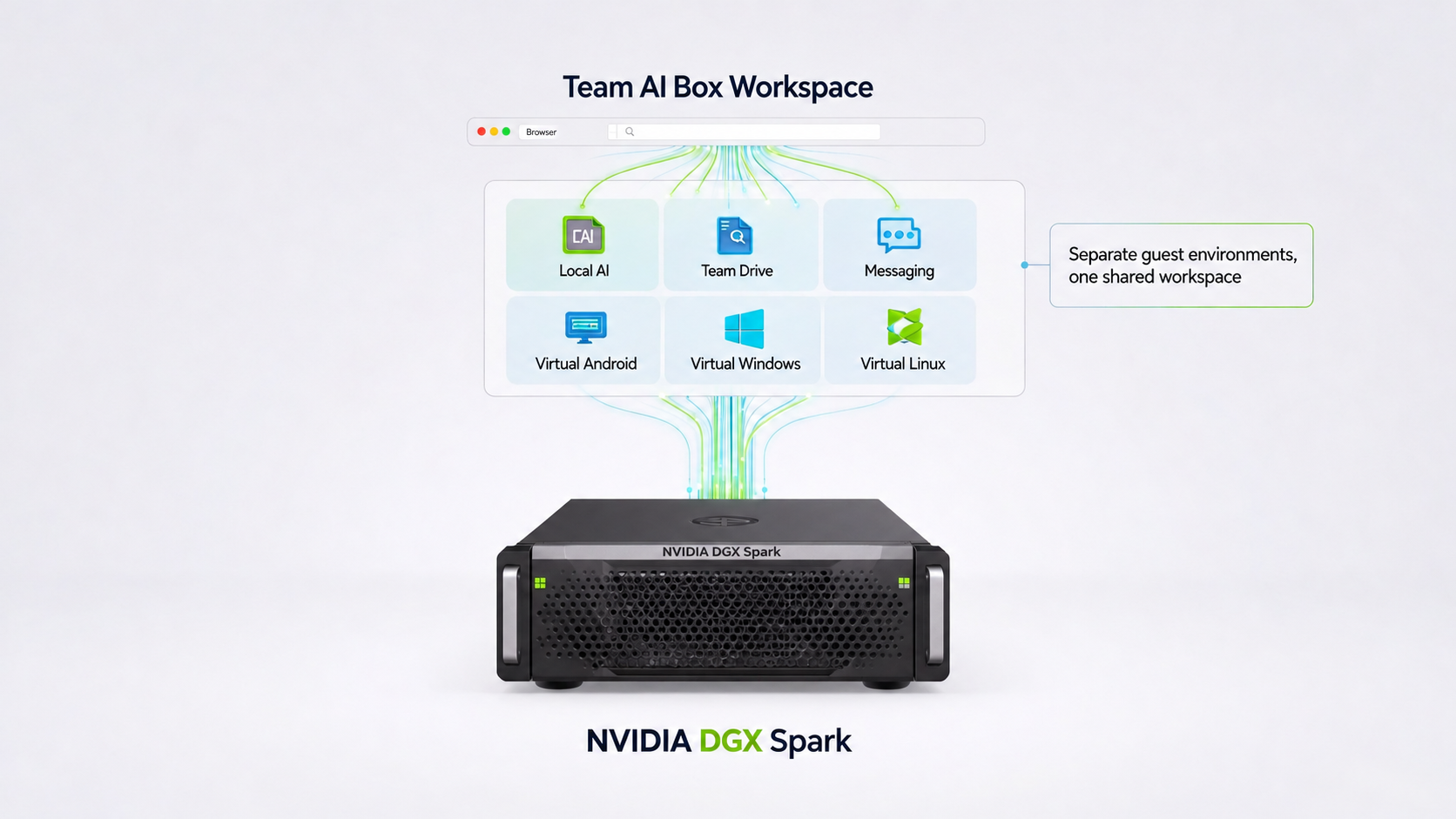 Conceptual architecture illustration: separate guest environments connected through one shared workspace.
What Is ARM64 Virtualization?
ARM64 virtualization is the process of running one or more ARM64-compatible guest operating systems on ARM64 hardware through a virtual machine or virtualization layer.
In practical terms, it allows a physical ARM64 system such as a DGX Spark to host environments such as:
- Windows 11 ARM
- Ubuntu ARM64
- Other compatible Linux distributions
- Persistent Android devices
- Development and testing environments
The guest system still has its own files, applications, accounts, and settings. The host system controls the underlying hardware and allocates resources to each guest.
This is different from emulation. Virtualization works best when the guest architecture matches the host architecture. Android’s documentation notes that ARM64 hosts should use compatible arm64-v8a system images for hardware-accelerated emulator workloads. Android Emulator virtualization requirements
Why Android, Linux, and Windows Together on One DGX Spark Matters
A modern team may need several operating environments during the same project.
For example:
- A designer may review a mobile workflow on Android.
- A developer may build and test services on Linux.
- A product manager may inspect a Windows application.
- An AI assistant may process the documentation and generate a summary.
- The team may store files and discuss results in the same workspace.
Without a shared workspace, these activities often happen across separate computers and accounts.
A DGX Spark with ARM64 virtualization brings the surrounding workflow closer together:
Team member browser
        ↓
Team AI Box workspace
        ├── Local AI applications
        ├── Team drive
        ├── Messaging
        ├── Virtual Android phones
        ├── Virtual Windows computers
        └── Virtual Linux computers
                ↓
        NVIDIA DGX Spark
Team AI Box lists local AI, image generation, text recognition, speech transcription, translation, messaging, team files, wireless casting, virtual Android phones, and virtual Windows and Linux computers as part of its browser-based workspace. View Team AI Box capabilities
The value is not simply running multiple operating systems. The value is keeping AI-assisted work, files, conversations, and virtual devices within one team environment.
Why DGX Spark Is the Foundation
DGX Spark provides the Arm64 compute foundation for the workspace. The key planning detail is that the host, local AI models, and virtual devices share system resources rather than receiving isolated workstation capacity.
The 128 GB configuration includes 128 GB of unified system memory and 273 GB/s of memory bandwidth. These specifications help explain the architecture, but they do not guarantee a fixed number of virtual machines or concurrent users. Read the NVIDIA DGX Spark specifications
That is why this article focuses on coordination between environments, while the separate capacity guide covers concurrency and workload planning.
Windows on Arm: The Compatibility Boundary
Windows on Arm can run native Arm applications and many x86 or x64 applications through emulation. Native ARM64 builds are generally the safest choice for compatibility and performance, but a Windows on Arm guest is not a guarantee that every application, driver, peripheral, or security tool will work.
Before using a Windows workflow in the shared workspace, verify the application architecture, emulation support, driver requirements, physical-device dependencies, licensing, and GPU requirements. Microsoft maintains current guidance for Arm-native development tools and application compatibility. Read Microsoft’s Windows on Arm documentation
Team AI Box therefore presents Windows on Arm as one guest environment within a broader workspace, not as a universal compatibility layer.
Android, Linux, and Windows Serve Different Roles
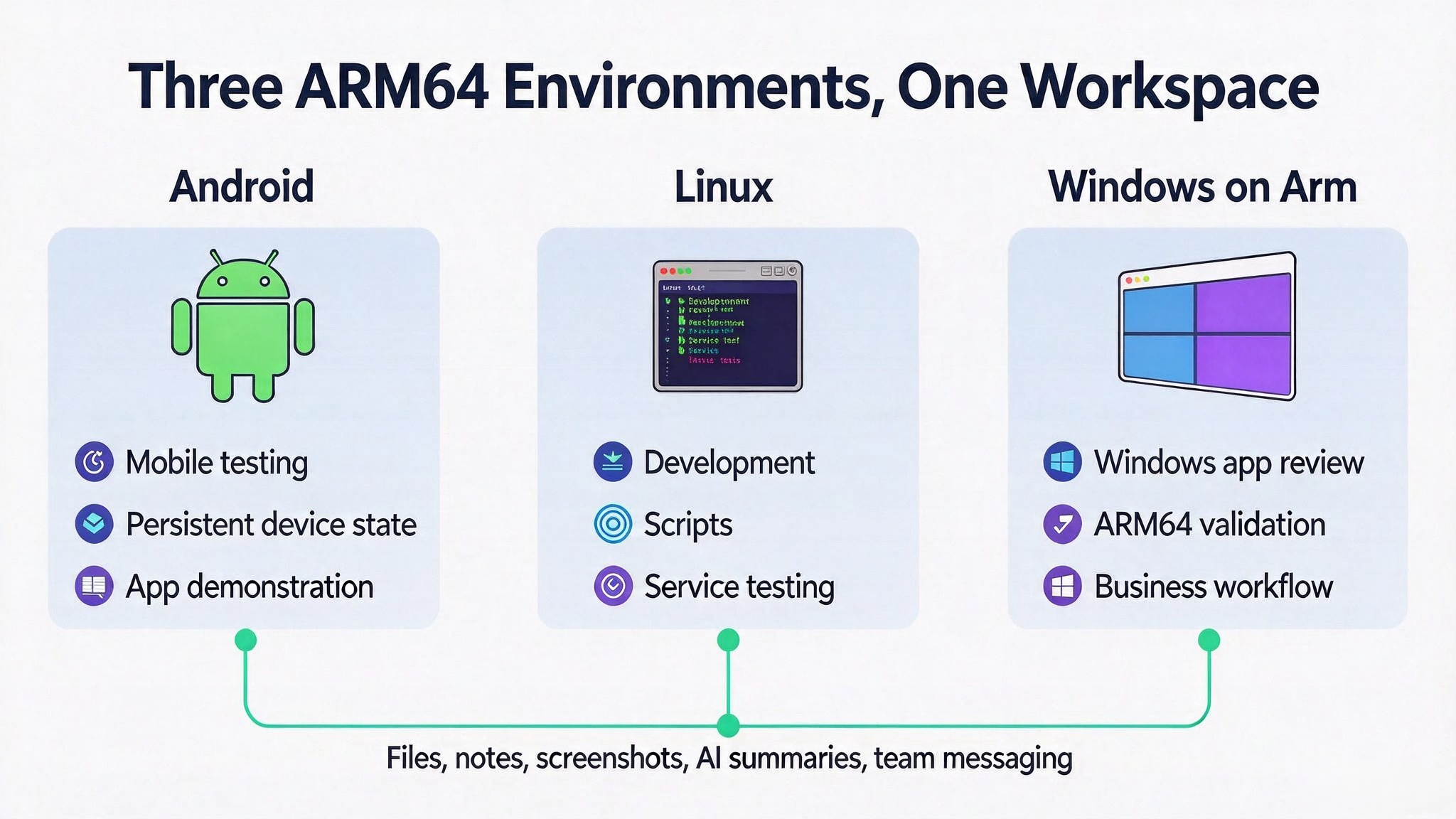 Conceptual comparison of typical Android, Linux, and Windows on Arm team roles.
A useful DGX Spark AI workspace does not treat every operating system as interchangeable.
Android for mobile workflows
Virtual Android phones are the piece most teams cannot get from a Windows or Linux VM alone. They can provide persistent environments for:
- Application demonstrations
- Mobile workflow testing
- Android interface review
- Repeatable device states
- Shared testing scenarios
Each virtual phone maintains its own applications and data. Google services and individual Android applications may have separate compatibility and licensing requirements.
Linux for development and technical work
Linux virtual computers are useful for:
- Software development
- Documentation builds
- Command-line tools
- Service testing
- ARM64 application development
- Reproducible technical demonstrations
The exact Linux distribution and image format must be compatible with the virtual hardware. A Linux distribution having an Arm build does not automatically mean that every downloadable image is a bootable ISO. Windows and Linux guests require compatible ARM64 installation media; persistent Android phones are provided as a separate workspace capability.
Windows on Arm for business and application testing
Windows on Arm can be useful for:
- Reviewing Windows applications
- Testing ARM64 builds
- Demonstrating Windows workflows
- Supporting users who need a Windows-based environment
- Comparing native Arm and emulated application behavior
The team must supply an appropriate Windows 11 ARM64 ISO and license. Team AI Box does not include a Windows license or promise that every Windows application will work.
How the Three Environments Share One Workspace
The three environments are not a single combined operating system. They are separate guests coordinated by one workspace.
- Virtual Android phones run as persistent devices that each keep their own apps and data.
- Virtual Windows and Linux computers are created from compatible ARM64 installation media and opened in the browser.
- Local AI applications, Team Drive, and messaging sit around those environments so people can act on what they see.
| Environment | Primary role | Shared workspace handoff |
|---|---|---|
| Android | Mobile application testing and demonstrations | Device state, notes, screenshots, and review messages |
| Linux | Development, scripts, documentation, and service testing | Source files, logs, technical notes, and AI summaries |
| Windows on Arm | Windows application review and ARM64 validation | Test results, compatibility findings, and project files |
| Team AI Box | AI assistance, storage, communication, and access | One browser workspace for people and supported devices |
For the exact Windows 11 Arm and Ubuntu installation steps—creating the virtual computer, mounting the ISO, and booting the virtual disk—follow the dedicated Windows 11 ARM and Ubuntu VM guide. This article focuses on how the environments combine for a team, not on repeating that procedure.
What the Shared AI Workspace Adds
Virtual machines alone do not create team collaboration.
A team still needs a way to move from a device or application result to a useful business output.
A typical workflow might look like this:
Test a mobile workflow on Android
        ↓
Capture notes or screenshots
        ↓
Ask the local AI assistant to summarize findings
        ↓
Store the result in Team Drive
        ↓
Discuss issues in team messaging
        ↓
Review the Windows or Linux implementation
Team AI Box brings these activities closer together by providing:
- Browser-based access
- Local AI applications
- Team file storage
- Direct and group messaging
- Virtual Android devices
- Virtual Windows and Linux computers
- Task-status visibility
- Shared access from multiple computers
The workspace layer is important because the model, files, and devices need a place where people can use them together.
For account setup and browser-based access, see How to Share One DGX Spark with Your Team.
Real Limits: Shared Resources
ARM64 virtualization does not create unlimited hardware capacity. On DGX Spark, the host, local models, every virtual machine, and the team’s files all draw from the same unified memory pool and bandwidth.
A virtual machine that boots successfully can still perform poorly when local AI inference and several guest environments run together. The practical limit depends on workload mix, model size, context length, and memory headroom—not on a fixed number of devices.
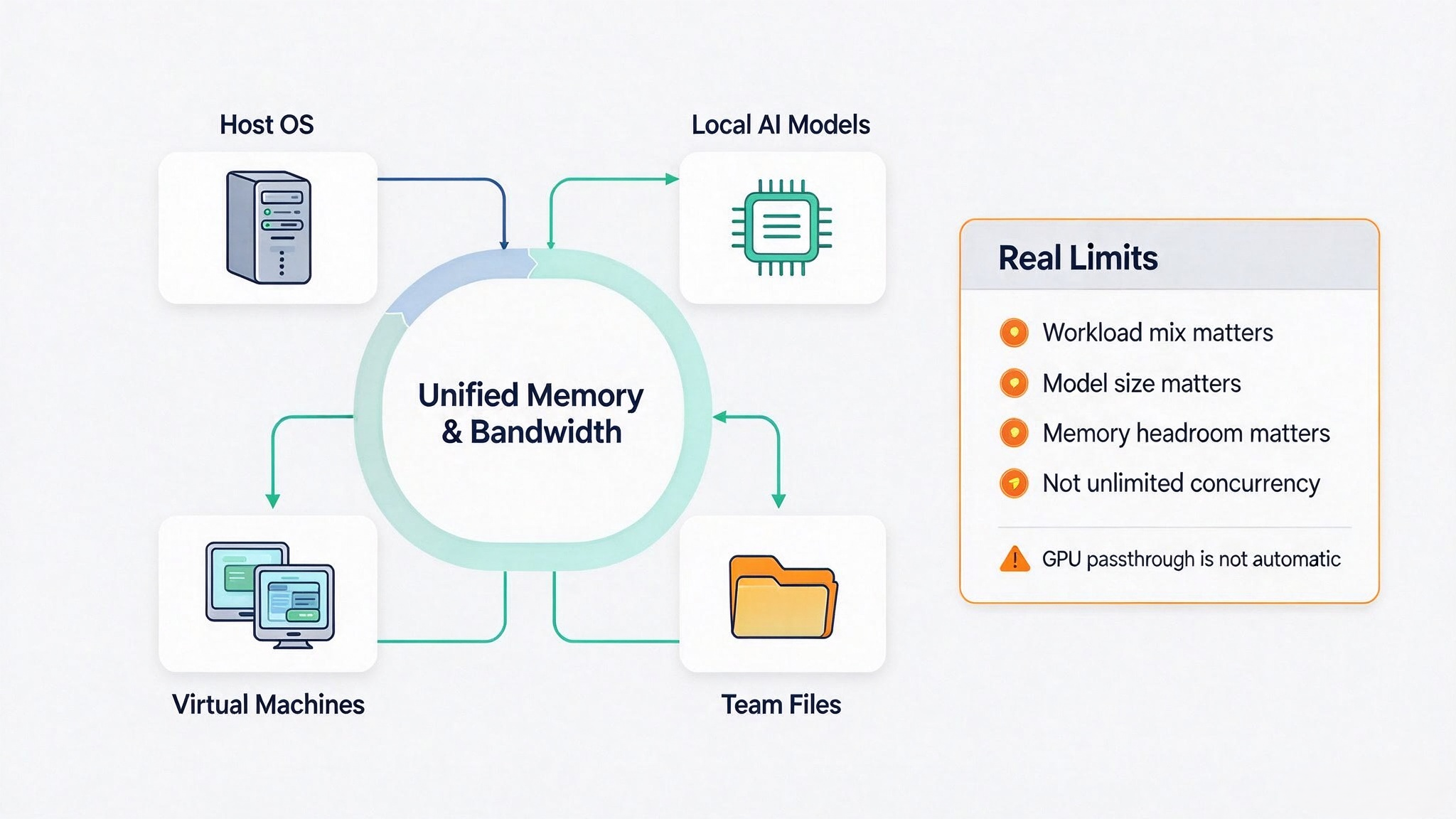 Conceptual resource map: actual capacity depends on workload and configuration.
For a full breakdown of concurrency and capacity planning, see the DGX Spark team capacity guide. This article assumes that planning context and stays focused on running multiple operating systems together.
Does Virtualization Provide GPU Passthrough?
Not automatically.
Creating a Windows or Linux virtual machine does not guarantee direct GPU passthrough or native-speed GPU compute inside the guest. Team AI Box presents virtual computers through a browser-based display and manages the guest environment, but the actual hardware access depends on the supported implementation and workload.
This is an important distinction for developers:
- A VM can be suitable for application testing.
- A VM can provide a repeatable ARM64 environment.
- A VM can support demonstrations and collaboration.
- A VM should not automatically be marketed as a dedicated GPU development server.
For heavy GPU workloads, verify the exact supported configuration instead of assuming that virtualization exposes the entire DGX Spark GPU to every guest.
Getting Started with the ARM64 AI Workspace
Team AI Box is installed on a fresh supported DGX Spark with the documented DGX OS (Ubuntu 24.04-based), ARM64, Docker, NVIDIA container support, and KVM environment. The complete host installation is covered by the DGX Spark deployment guide.
After the workspace is running, create virtual devices from the browser. Supply compatible ARM64 installation media and licenses for Windows or Linux guests; persistent virtual Android phones are provided as a separate workspace capability. This article focuses on the cross-platform workflow rather than repeating the installation procedure.
Frequently Asked Questions
Can one DGX Spark host Android, Linux, and Windows on Arm?
Yes. Team AI Box can host persistent virtual Android phones and virtual Windows and Linux computers on supported DGX Spark hardware. They remain separate environments inside one browser workspace. Selected workloads can run concurrently when memory, CPU capacity, storage, and workload mix allow it; this is not a guarantee of unlimited concurrency.
Does Team AI Box include Windows or Android images?
Team AI Box provides persistent virtual Android phones and the virtual-computer environment for Windows and Linux. Users supply compatible Windows 11 ARM64 or Linux ARM64 installation media and any required operating-system licenses. Compatibility for individual Windows applications, drivers, and Android services must be checked separately.
Does a virtual machine get full GPU access?
Not automatically. Application testing and repeatable ARM64 environments are realistic uses. Treating every guest as a dedicated GPU development server is not. Verify the supported configuration before relying on GPU compute inside a virtual machine.
Conclusion: One DGX Spark, Three ARM64 Environments
The most useful way to think about Android, Linux, and Windows on Arm is not as one operating system replacing another.
It is a coordinated workspace running on one DGX Spark:
- Android provides persistent mobile environments.
- Linux provides flexible technical and development environments.
- Windows on Arm provides a guest environment for Windows workflows.
- Local AI helps process files, generate documentation, and summarize results.
- Team files and messaging connect the work between people.
That is the practical promise of a DGX Spark team workspace.
Team AI Box uses NVIDIA DGX Spark as the local compute foundation and adds the browser-based workspace needed to make virtual machines and local AI useful to a team. Before deployment, confirm ARM64 compatibility, provide authorized installation media, check licensing, and test the combined workload.
Explore the Team AI Box capabilities, read the Windows 11 ARM and Ubuntu VM guide, or review the DGX Spark deployment guide.